Ten minutes at the printer before you ring
Plenty of Zebra calls end at a setting and not a part. Work through these and you will either cure it or give us something useful to start from.
- Look at the light. Which colour is it, and is it steady, flashing, or swapping with another colour?
- Compare the print method the printer is set to, direct thermal or thermal transfer, with what is loaded. A ribbon inside a printer set for direct thermal, or no ribbon in a printer set for transfer, throws alerts that pass for faults.
- Hold a label against the sensor. Gapped labels, labels with a black mark printed on the back and a continuous roll each need a different sensor setting.
- If it can print a configuration label, print one and keep it.
- Note where it sits: next to a roller door, in afternoon sun, on a damp bench, in a cold room.
There is no need to quote a part number. The sticker underneath the printer, the make and a description of the fault are plenty.
What it looks like from the dock
Staff report outcomes, and they are specific. A barcode that read fine yesterday and fails today. A white stripe running down every label. Blank labels coming out, or three feeding before a stop. A grey smeared ghost across the print where the ribbon creased. A printer showing online that takes no notice of the job. A red light that will not go out even with the cover shut.
Each of those has only a few suspects. The white stripe, for instance, is nearly always a row of dots burnt out in the head.
Yatala racking, Southport wristbands, Currumbin coolrooms
If a building has racking, a Zebra probably sits on a desk by the goods in door. The industrial estates at Yatala, Stapylton, Molendinar and Arundel are full of them, along with the pick and pack firms and trade suppliers around Nerang and Burleigh Heads. One failure stops the whole shift. Boat builders and marine suppliers add salt air and damp, which work slowly on connectors and casings.
Healthcare depends on them just as heavily. Hospitals, pathology collection rooms, pharmacies and clinics around Southport and Robina run wristbands and specimen labels round the clock, and the printers get wiped with alcohol by staff in a rush. That suits the head and is hard on some plastics.
Food packers and cold stores put labels on cartons that then go into chillers, and condensation or cold stock shows up as labels that lift and print that fades. In all of these places the media sensor is the first thing to clog, as dust gathers on it well before anything wears. A sensor blind to the gap between labels is why a printer feeds one whole label and a bit more.
Reading a Zebra name
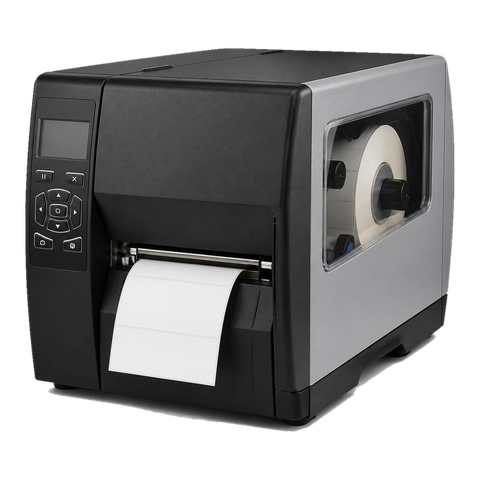
The first two letters are the family: ZT is industrial, ZD desktop, ZQ mobile and ZC card. Next comes a number whose hundreds digit marks the series. The ZT400 series contains the ZT411 and ZT421. The ZD400 series contains the ZD411 and ZD421, and the ZD621 stands next to them. Zebra describes the ZT411 as printing up to four inches across, in either thermal transfer or direct thermal, with peeler, cutter, liner take up and full rewind options and resolutions of 203, 300 or 600 dpi.
Desktop ZDs belong on counters, pharmacy benches and packing desks. ZTs stand on the dock or in the dispatch bay and work the full shift. We chase the same suspects on each, in the same order: head, platen roller, sensors, then settings.
Printers on our books
Zebra retires and renames models regularly, so use this as a guide only. If yours is not here, send us what the label says.
- ZD411, ZD421 and ZD621 are the current desktops. We see them at counters and packing desks, and they give trouble through the head, the platen, a dust clogged sensor and the latch.
- GK420d and GK420t are the older desktops many local sites still run. Head, platen and the thermal sensor are the usual suspects.
- LP2844 and TLP2844 are veterans in back rooms and Zebra has discontinued them. They wear out in the head, the roller, the plastics and the serial or USB sockets.
- ZT411 and ZT421 are the dock and factory printers, with the ZT410 as their predecessor. Head, platen, ribbon spindles, drive belts and sensors take the wear.
- The 110Xi4 is an earlier heavy industrial generation that still runs in plants and big docks. Head, platen, and the rewind and ribbon drives age first.
- ZQ520, ZQ620 and ZQ630 are mobile printers carried on a belt, in a cab or on a ward. Batteries, heads, platens, cover latches and cradle contacts fail.
- The ZC series prints ID badges and access cards. Head, cleaning roller and feed rollers are what we replace.
What the lights mean, as Zebra describes them
Zebra publishes light patterns model by model, and one colour does not mean the same on a ZD421 as on a GK420. The meanings below are the maker's own. Before any part goes on a quote we confirm with a test.
- Steady green: powered and idle.
- Flashing red: the printer is out of media or ribbon, or a cover is open.
- Flashing amber: on the GK series, the head has overheated. Printing resumes once it cools.
- Two green flashes in a repeat: paused. The feed key gets it going.
- Green and red alternating: on the GK series, the flash memory has not been programmed. That needs a service visit.
- Text on a screen such as Head Open, Ribbon Out or Media Out: screen models spell it out. Media Out frequently points at a sensor or calibration fault, not an empty roll.
- Cut error: the cutter blade has jammed and needs a technician.
Direct thermal, thermal transfer, and the roll you actually loaded
Direct thermal means a heated head darkens a coated label, with no ribbon. Thermal transfer means the head melts ink from a ribbon on to the label. What the printer is set to has to match the stock. Choose transfer with no ribbon fitted and you get ribbon out. Choose direct thermal with a ribbon fitted and some models warn that a ribbon is in.
Creased ribbon belongs to transfer printing. The usual reasons are a ribbon wound crooked, spindles that stick, a ribbon narrower than the label, or uneven head pressure. We look over the ribbon path, the pressure and the roller, and then show whoever loads the printer how to do it so the creases do not come back.
Be suspicious of the stock too. Thick labels, adhesive that gums the rollers, a ribbon not made for the label, or a media width the printer was never told about can each pass for a dead part. Direct thermal stock also fades in sunlight. If the label is the cause we say so and leave the printer alone, since a new head is a costly way to learn that.
On screen messages, and what we check behind them
These messages come from Zebra's ZT411 and ZT421 guide, apart from Printhead Over Temp, which was cross checked against the ZD421 and ZD621 guide.
- Head Open means the head is not shut fully. We check the latch, then the head open sensor if closing it does not clear the message. Zebra states that a failed sensor needs a technician.
- Ribbon Out in transfer mode means no ribbon, a ribbon loaded wrongly, or a faulty ribbon sensor. We look at the ribbon path, the sensor and the mode setting.
- Ribbon not detected means the ribbon is correct but the printer cannot see it. Zebra suggests calibrating or restoring defaults, and we calibrate first, then examine the sensor.
- Thermal transfer selected for direct thermal media means the printer is waiting for a ribbon the label does not need. Change it to Direct Thermal. We compare the method with the stock.
- Ribbon loaded in direct thermal mode is the reverse: remove the ribbon or switch to transfer. It is the same setting seen from the other side.
- Media Out means media missing, or not threaded as documented. We check threading, sensor position and calibration, because a full roll can still set it off.
- Printhead Over Temp has Zebra advising you to move the printer out of direct sunlight, so we look at where it stands.
What wears, roughly in this order
- Printhead first. A burnt dot becomes a white line. Rough stock shortens the life, and a cool head wiped with the right pad lasts longer.
- Platen roller next. Once glazed or flat spotted it skews the feed, leaves pale patches and lets labels wander.
- Then the media and ribbon sensors, which dust, adhesive and ink coat. A good clean often fixes what looked like a failed part.
- On industrial models, drive belts and gears. Noise and slipping give them away.
- Cutters and peelers, where adhesive causes the jams.
- Batteries and cradles on mobile printers, which die partway through a shift.
Calibration, darkness and ZPL
If labels creep along the roll, or the printer claims there is no media with labels in plain sight, it needs calibrating against the stock actually loaded. Gap, black mark and continuous stock are sensed in different ways and the printer must be told which one it has. Darkness and speed pull against each other. Run it too dark and the head burns, too light and it looks like a head on its way out. We set both for the stock and judge on a test print.
Zebra printers speak ZPL, older ones EPL. When a job prints at the wrong size or sits off centre on the label, the cause is often a driver or template setting and not hardware. On current models Zebra Setup Utilities and Link OS give us the configuration, the network settings and the firmware, and let us put a working printer next to a faulty one for comparison.
Hot docks, cold rooms, greasy kitchens
Summer on a loading dock is hot, and the dust never goes. A cold store thickens adhesive and curls labels. A workshop packs a printer with fine grit. A cafe kitchen adds grease.
Where it sits can matter more than how much it prints. Zebra advises moving a printer that over temps out of direct sun, and in a shed with the roller door open and the afternoon sun pouring in, that counts as a real repair. A chilled dock does the reverse, and Zebra lists a head below operating temperature as its own alert. A shelf clear of the door, or a cover over the media, sometimes does more good than a part.
How a Zebra call runs
Phone with the model and what it is doing. We work on site, so the printer is not posted anywhere and your label stock stays where it is. We service and repair the printer and do not supply labels.
A burnt row of dots can look like a dead head and turn out to be residue. A dirty cutter can pass for a broken one. We test first, tell you what we found, and settle the cost with you by phone before booking anyone in. The technician brings the common spares, and if the lines are busy your call is logged and we ring back.
Wristbands and the clinical side
Few machines we repair are less forgiving than a wristband printer on a ward or in an emergency department. The band has to read, the barcode has to scan at the bedside, and a printer that halts sends staff back to handwriting. The heads in these printers work all day, and the alcohol wipe is part of the routine.
Pathology and collection rooms print specimen labels in the same way on a smaller scale. A little ZD on a bench turns out hundreds a day, and the early sign is a barcode that scans one time in three. We would far rather hear from you then than on the day it stops.
Direct thermal stock and the sun
Direct thermal labels darken with heat and light. A label left on a dashboard or stacked by a window in the afternoon can go grey before it is used. Shipping labels printed on that stock fade in a warehouse over a few weeks. If your labels are going dark in the roll, the printer is not at fault. It is the stock.
Thermal transfer labels with a resin or wax resin ribbon last longer and resist rubbing and chemicals better, which is why they are the choice for asset tags and anything that has to survive. Matching ribbon to label matters, and we check the pair when a print looks smeared.
Repair, replace, or clean?
A desktop Zebra is not costly, so any repair has to be weighed against replacement. On some models a head costs a fair share of a new printer. We begin by cleaning the head and sensors and checking the settings, which cures more than people expect.
On the industrial ZT range the sums go the other way. They are durable and expensive, so a head or a platen is money well spent. We tell you which camp yours is in.
Getting jobs to the printer
A Zebra that is online and still ignores a job is usually a data problem. The label template may have been built for a different printer, a different resolution or a different label size. The driver might be sending it as graphics where the system expects raw text. A job sent to the wrong address will never arrive.
We check the path, print a configuration label, compare it with a printer that works and look at the template. When the fault is in the software that produces the labels, we tell you and leave the printer alone.
Here is how your Zebra gets fixed

The second callout
The cheap visit is the one that fixes it
The true cost of a bad repair is the Thursday it comes back. The machine fails again, the committee papers are due and the front desk is on the phone to someone new.
It is plain arithmetic. One visit done well costs less than two done quickly, and nobody has to explain the delay to a board.

- History read first. Past faults on the machine shape what gets packed in the van.
- Finished means tested. Every tray, the scanner and the finisher get a run.
- Repeat fault, no bill. If it returns, so do we.
Keep reading
Commercial printer repairsWorkgroup lasers and fleets, repaired where they sit. Brands we repairPick your make for models, codes and how we work.
 OKI repairsLED colour machines and Microline impact printers, fixed on site.
 Lexmark repairsLexmark numbers decoded: 200 jams, 31 cartridges, 920 fusers.
 HP printer repairsLaserJet codes read like a sentence. We read them aloud.
 Photocopier repairsAny make of office copier, repaired where it stands.
Buy, sell and lease
Buy, sell and lease commercial copiers on the Gold Coast
We also sell new and refurbished commercial copiers and buy used ones. Same team, same technicians.


A few recent visits

Common questions from Gold Coast offices
There is a white line down every label. Is the printhead finished?
It may well be a burnt row of dots, but residue looks the same. We clean and test before declaring the head dead.
The roll is full but it says Media Out. Why?
Most often a sensor that needs cleaning or calibrating, or stock the printer has not been set up to read.
What does flashing amber mean on our GK420?
Zebra describes it as the head running too hot on the GK series. It carries on after cooling.
Can you still fix an LP2844?
Yes, as long as the case and parts hold up. Zebra has discontinued the model, so we tell you honestly when a newer printer makes more sense.
Why does the ribbon keep creasing?
Look for a crooked wind, stiff spindles, a ribbon narrower than the label, or uneven pressure on the head. We check all four and show the operator how to load it.
Do you look after the ZQ mobile printers?
Yes: batteries, heads, platens, latches and cradle contacts.
Do you repair ID card printers?
Yes, the ZC series. That means the head, the cleaning roller and the feed rollers.
Do you supply labels and ribbons?
No. We repair the printer, and we will inspect your stock if it seems to be behind the fault.
Will you come to a unit at Yatala or Molendinar?
Yes. Tell us the suburb and what has stopped and we will say what we can arrange. Same day service is available.